By Stuart Brown
Cyber security specialist
2017 it seems will be the year of ransomware. Already this year malicious developers, or black hat hackers, have released newer and more powerful versions of computer programs that, put simply, “demand money with menaces”.
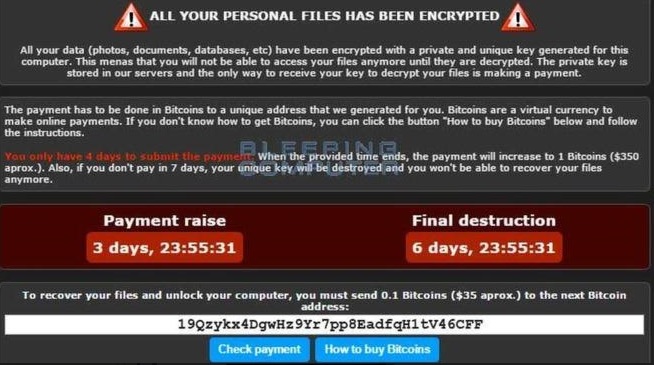
Ransomware works by anyone clicking on a download link of an infected picture or file that has been tampered with which appears perfectly normal yet infects and invariably locks the computer. The on-screen message provides payment details to obtain what is called a decryption key as “the menace” is the fact that the malicious program has begun to encrypt your precious personal data files, pictures etc.
Payment is sought mainly online through bitcoins but sometimes over the phone in US dollars. Often the longer you do nothing the more data is encrypted and the ransom increases.
Bitcoins – what are they? An online digital currency that is pretty much untraceable and synonymous with cybercrime and the darker underworld of the internet. It has legitimate uses but happens to be favoured by online criminals – who often provide links to help you buy them!
Encryption is a secure way of scrambling ordinary computer files into what appears to be an unreadable format. To make them readable again a key is required to unlock or decrypt the file contents.
Who’s at risk? Everyone who has a device connected to the internet, from private individuals, small, medium and large businesses, even our local council has admitted it has been affected more than once by ransomware. Readers may remember Lincolnshire County Council shutting down its computers for a week in January 2016 because it had been targeted.
What precautions can you take? Back up your data is the only answer. Paying these people should not be an option. Ensure all your computers and devices are running up-to-date versions of software with all security updates and anti-virus software updated.
What should you do if you get infected? Take a photo of the on-screen message, physically turn off the computer (remove the battery if it’s a laptop) so that the program cannot cause any more damage. Consult an expert who can remove the program safely. Report the incident to Action Fraud (www.actionfraud.police.uk) or 0300 123 2040.